 English

66629

 In this guide, we will look at how to obtain all holders of a fungible token such as USDC. This is useful in situations where you want to track token holders or reward holders for airdrops. OverviewLet's first look at tokens, specifically how they work on Solana. When developers create a token, they use the Token Program to create a minting account. This minting account holds information about a specific token, such as name, token address, and image. Once the minting account is created, Tokens can be minted and stored in a Token account. Token account is an account that saves information about a specific Token and is owned by a specific address. The Token account will include details such as the minting address (corresponding to the Token Address in the figure below), the owner's address, and the number of specific Tokens in the account. For example, holding some USDC (an SPL Token [1] )'s address will have a USDC Token account. 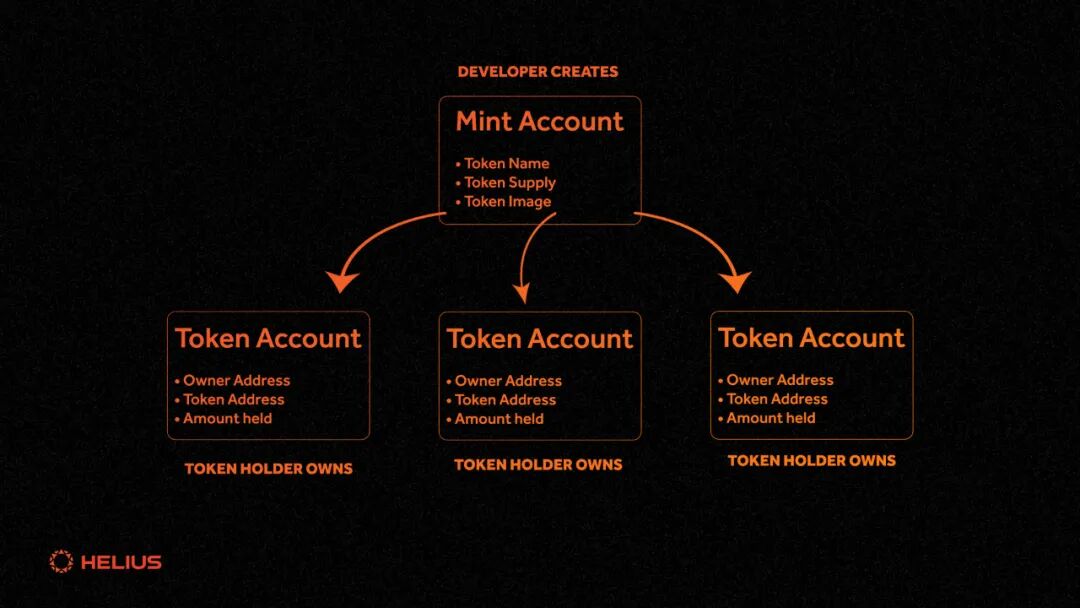
Now that we understand how Tokens and Token Accounts work, we can look at how to get all Token holders for a given Token. Each wallet holding a specific Token will have a Token Account for that Token. This means that the Token is associated with the Token account that holds the Token wallet. This is how we will find out all the holders. If we could find a way to get all the token accounts associated with a token, and then get the owners of those accounts, we would have a list of all holders!
getTokenAccounts method Fortunately, the Helius **getTokenAccounts** API method[2]Allow us to do this precisely. We can include the minting address of any token in the API call parameter and we will get a list of all token accounts created for that token. In addition to this, the API also returns the owner of each Token account ; This owner is usually called the Token holder. One small thing to note is that one account can have multiple Token accounts for the same Token. it's not a big problem ; We just need to set up some logic to handle the shared owner's token account. accomplishNow let's dive into some code and see how we actually do this. You'll need a Helius API key to follow. You can access https://dev.helius.xyz [3] Sign up for a free account to get one. First, we have to create a Javascript file called getTokenHolders.js. We can save our results to a JSON file by adding our Helius URL and importing the fs library. const url = `https://mainnet.helius-rpc.com/?api-key=`;Next, we will create a method to get all token accounts associated with a specific token. We can start by creating a method called findHolders that will use the getTokenAccounts method to get the required data. you can here [4]Learn more about the getTokenAccounts method. One important thing to note is that each call to the API can only return a maximum of 1000 Token accounts. Most large tokens on Solana have over 100,000 token accounts. To solve this problem, we will use pagination to browse all token accounts and continue making API calls until we have fetched data for all existing token accounts. In this method, we will include the Token minting account number in the parameters of the getTokenAccounts call. As we iterate through all token accounts, we will add each unique token account owner to a list. Once the method completes, we will save this list to a JSON file containing all token holders. const findHolders = async () => { In the above example, the getTokenAccounts method is called multiple times while paging through all Token accounts. The API response will provide the following data for each Token account: {We extracted the owners from these token accounts and added them to our list. If we wanted, we could also store the number of tokens held by each token account to find the largest holders. Now once this operation is complete, all we need to do is call this method: findHolders();The complete code in our getTokenHolders.js file should look like this: const url = `https://mainnet.helius-rpc.com/?api-key=`;outputThe output of our code will be a list of all holders, looking similar to this: [ You can use our replit example[5]Let's test this. in conclusionTo summarize below, we have successfully introduced the process of identifying Solana Token holders through the Helius getTokenAccounts API. This step should provide you with the necessary skills to interact directly with your token community. Original text: https://www.helius.dev/blog/how-to-get-token-holders-on-solana
 References[1]SPL Token: https://spl.solana.com/ [2] Helius getTokenAccounts API method: https://docs.helius.dev/compression-and-das-api/digital-asset-standard-das-api/get-token-accounts [3] https://dev.helius.xyz: https://dev.helius.xyz/ [4] here: https://docs.helius.dev/compression-and-das-api/digital-asset-standard-das-api/get-token-accounts [5] replit example: https://replit.com/@owen47/getTokenAccountsExample |

|

|

|

|

|
